
• Armory Digital Racing Designs Website has been shutdown, for more information you can read here: More Details
    All downloads from the site and future content are avalaible here

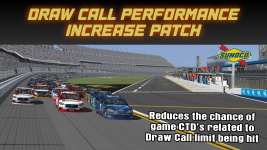
Draw Call Performance increase patch released

Mystical

Test Rank
Staff member
Admin
Joined
May 28, 2022
Posts
973
Reaction score
716
Points
93
Website
adracingdesigns.com
Draw_Call_Patch.png

Download here: https://www.adrd-forums.net/index/resources/draw-call-performance-increase-patch.2048/

With so many new mods and exe patches releasing one aspect that has been neglected are performance increases and CTD mitigation. Even before many of these new exe features started coming out NR2003 was prone to CTD when using a very heavy mod combined with a heavy track. For example Daytona BBMC + FCRD22 mod. It was extremely easy when racing or even easier in replay views to crash NR2003 to desktop. The reason was not due to framerate, in most cases a user's FPS could still be 50-80fps when game CTD's.

The reason the CTD's occurred was due to the game's Draw Call limit being hit. Each separate mesh rendered added to the draw call limit and vertex count. This dll patch simply ups the possible vert and indices. The stock rend_dxg.dll locks one dynamic vertex buffer and one dynamic index buffer and copies the frame into them. The vertex buffer is 8,192 vertices. A replay camera on a high-poly wreck, or a car body over 8,192 vertices in one draw, fails every existing buffer, then a new 8,192-vertex buffer is created and the copy writes past the end. The patched DLL uses 32,768 vertices and 65,535 indices. The same track and car sets that crashed on the stock DLL stayed up with this one, in normal racing views and in replay views.

I noticed immediately raising these limits common replay views that would always CTD now no longer CTD. I would swap in and out from the modified dll vs the original dll values and without fail the original would crash the game while the modified one I could watch extremely performance demanding replay views or giant wrecks racing on the front stretch of Daytona BBMC with no CTD's anymore.

If you know certain mods and tracks + replay views crashed your game try this new dll, you might be surprised the CTD's no longer occur. Included in the download is the new dll, readme, and the source code if you prefer to make the dll edits yourself.

One last note I want to make. With these raised limits this is not a call that we should start making mods even more detailed or disregard poly limits, framerate is not changed with this dll so frame related issues will not help if you disregard poly limit because the dll might reduce some CTDs


Since testing the dll I've been able to view any replay and zoom in with no CTD, just a few screenshot example I couldn't take before without the game crashing (using max settings):
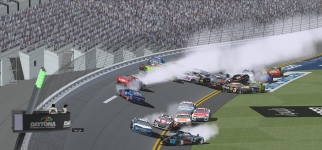
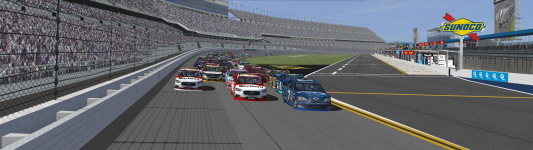
Screenshot_20261017_213615.png

Screenshot_20261017_214124.png
 
Last edited:
Massive props for including the addresses and assembly code to document exactly how this works and why it works.
 
Massive props for including the addresses and assembly code to document exactly how this works and why it works.

No problem. I think all the exe stuff is cool but I've not tried them yet as there are so many and I'll wait for more fixes and hopefully more source code to be released so I can pick and choose what I personally want to edit on my own exe. Hopefully this dll patch will prevent stability issues a bit more, especially with mods like the fire and soft body crash exe edits those dramatically increase draw call limits and this might help mitigate CTDs more.

I just want NR2003 to be the most fun and stable. Maybe someone can find even more improvements and find more performance gains in other ways and if the source edits I provided helps thats a win for me.
Yeah, I find a lot of the newer vibe coded additions to the game (less so peripherals) to be made in a very irresponsible way. Especially when the people making them really don't understand the fine details of what an LLM is even doing.

This is pretty clearly not the case; a readme saying, basically; "Here's how you can recreate what I did, and here's why it works and what it does" is the kind of thing this community needs more of. I've tried to do that with a lot of trackside objects I've released, even ones where the object scripts are probably pretty terrible, especially given my approach to LODs.

The one thing that might help out a lot is if something like this were to be found for rend_ogl as well, particularly the version of it that Sandbox uses. Specifically because there are a few tracks I've made that take a frustratingly long time to load in to Sandbox, which require some very elaborate methods to even resume work on them. Loading one copy of every object on the track and then loading the .ptf for Gravis City Zone 7 is a painfully long process.

That being said, something like this will probably motivate me to add more details to Zone 7 v2, even though almost everything on that track has an LOD switch, in part because I'm a little paranoid about it suddenly crashing after running at 100 FPS around the entire lap.
 
I haven't been paying enough attention to these forums. How did you even identify this as the cause of a crash caused by high-details mods/tracks?
 
I haven't been paying enough attention to these forums. How did you even identify this as the cause of a crash caused by high-details mods/tracks?

I knew NR2003 was not crashing by framerate alone, many times game would CTD even when I was at 80 fps at times and I know the game does have a limit for verts on the screen (just from mod creation and learning these limits from the web over the years). Having made mods and testing them on BBMC Daytona which is my banchmark track I've gotten pretty accustomed to getting the game to crash. After editing the dll I compared the edited version vs the non edited in the game swapping them out using the FCRD22 mod + Daytona BBMC Most replays with full field and high detail all on its would CTD every time. But moment I swapped in the patched one couldn't crash once even on the extremely zoomed in replay cameras.
 
Interesting.

There are a couple of questions I have about what was said in the OP: Some of what you said implied that NR2003 just allocates another pair of buffers when the batch's vertex count reaches the limits of the first buffer. But some of what you said implies that NR2003 (each frame), copies the first mesh batch into the buffer, renders, then copies the second batch into the buffer, renders, and so on until a batch limit is reached. Which method does NR2003 use? Also, do you know if a mesh can be split between two batches?
 
Short answer is no a single mesh can't be split to my understanding. Also in my download I have a txt file if you want to edit the same address lines, maybe you can find additional performance gains. I'm not super good with deep coding related to the game engine so asked Cursor to explain in detail the dll edits I made and how it works:


During a frame the renderer keeps a cursor in one dynamic vertex buffer and one dynamic index buffer. For each batch it locks at that cursor with D3DLOCK_NOOVERWRITE, copies the batch, advances the cursor by that batch's real vertex and index counts, and submits the draw before the next batch. The next batch starts after the previous one. The buffer is not rewound and overwritten for every batch, and the whole buffer is not drawn once at the end.

A new buffer is opened only when the current one cannot take another reservation, or when the vertex format does not match. The reservation is fixed, not the size of the mesh:

Vertex buffers switch once fewer than 2,048 vertices remain (capacity - 0x800).
Index buffers switch once fewer than 6,144 indices remain (capacity - 0x1800).
The matching buffer in this frame's half is reused if it has that much room. Otherwise a new one is created at the same fixed size: 8,192 vertices and 32,768 indices in the stock DLL, 32,768 vertices and 65,535 indices in the patched DLL. Different vertex formats also get their own buffers. At the start of the next frame the renderer flips to the other half of the slot table (128 slots a side), resets those cursors, and leaves the previous half alone so the GPU can finish it.

A mesh is one copy. The car-body path is a single rep movs of stride * vertex count from the mesh, and the cursor moves by that full count. There is no loop that cuts the mesh into 2,048-vertex pieces. Its indices are 0-based inside that one copy, so they assume those vertices sit together in one buffer.

That is also why a mesh larger than the buffer still overflows. The fit test only asks whether 2,048 vertices are free. A 10,000-vertex mesh on an empty stock buffer passes that test, then the copy writes all 10,000 vertices into an 8,192-vertex buffer. The patch makes that particular mesh fit. It still does not divide one mesh between two buffers, so a single mesh above 32,768 vertices overflows the patched buffer the same way.
 
Back
Top